
Skip to content
A canvas tent half pitched on a grassy ridge at sunset, with a backpack, rope, lantern and stacked firewood beside a cold fire ring
Guides

How to host your own email in an evening

You can run email on your own domain from a small server you rent, and the install itself fits in an evening. The part that takes longer is asking your provider to open port 25, so do that first.

You need three things: a domain, a small VPS with port 25 open and reverse DNS you can set, and a few hours. Then you pick the software. There are free and open source servers you assemble yourself, like Mailcow, Mailu, iRedMail and Mail-in-a-Box. There are packaged ones like UNA. And there is rented mail, which is fine too.

This guide uses UNA as the worked example, because it is what I build. Where the others differ, I say so.

The evening

What “an evening” really means

The evening covers installing Docker, running the installer, publishing your DNS records, getting a certificate, creating your first mailbox and sending a test.

It does not cover waiting for your provider to open port 25. That can take a day or more. DNS also takes a little time: A records usually resolve in 5 to 10 minutes.

Do this a day ahead: get port 25 opened

Port 25 is how other mail servers deliver to yours. Most providers keep it closed on a new server until you ask.

Open a support ticket asking them to “remove the SMTP block on port 25”. Once they approve it, stop and start the server from their control panel. A reboot from inside the server is not enough.

Incoming is what you need. If your provider will not open outbound 25, UNA can send through Amazon SES or any SMTP relay instead. If they will not open inbound 25 at all, pick another provider.

Stuck on the server side? I’ll install it for you for €149, first year included.
What you need

What you need before you start

A domain

And access to its DNS at your registrar, or someone who can add records for you.

A VPS

With its own public IPv4 address, on Ubuntu, Debian, CentOS or AlmaLinux, with 1 GB of memory or more.

Port 25

Open for incoming mail.

Reverse DNS (PTR)

That you can set for the server’s IP at your provider.

Docker and Docker Compose

Step 2 covers this.

Why not a computer at home

Other mail servers have to be able to reach yours from the internet. A computer at home sits behind a router, usually without a fixed public address or a way to set reverse DNS. It needs to be a server on the internet.

I run UNA on Vultr, and its 1 GB server is enough. The domain and the server are your own bills, paid to your registrar and your provider.

Your options

Pick your software: free, packaged, or rented

Free and open source

These are good, free projects. You install, configure and update them yourself, and they include IMAP, so desktop mail apps connect.

  • Mailcow (mailcow.email): a full mail suite that runs in Docker.
  • Mailu (mailu.io): a simple mail server as a set of Docker images.
  • iRedMail (iredmail.org): a script that sets up a full mail server on Linux.
  • Mail-in-a-Box (mailinabox.email): turns a fresh Ubuntu server into a mail server in one go.

Check each project’s own docs for its current requirements before you pick one.

If you enjoy assembling and looking after the stack yourself, one of these is a good fit.

Packaged: UNA

UNA brings up Postfix, Rspamd, ClamAV, Postgres, Redis, nginx, certbot and the webmail from one installer. It is built around an address for every sender. Every message shows which address it came to. When one leaks, you switch it off and the sender is told it does not exist. You can rotate it to a fresh address in one step.

One install covers unlimited users, mailboxes and aliases. It is free for 90 days, then €49 a year per install.

Good to know first:

  • UNA is proprietary, not open source. The container images are public, but not for modifying or redistributing.
  • It is webmail only. There is no IMAP or POP3, so Apple Mail, Outlook and Thunderbird do not connect. On your phone, the webmail installs to the home screen and sends notifications.
  • One install serves one domain. A second domain needs its own install.

Rented mail is fine too

Google Workspace, Microsoft 365, Fastmail, Proton Mail, Zoho Mail, or the email that comes with your hosting are all reasonable choices. They are easier to start, and apps are included. The difference is who holds your mail: they do.

Which route fits

RouteWho looks after itDesktop mail apps (IMAP)Who holds the mail
Free and open source (Mailcow, Mailu, iRedMail, Mail-in-a-Box)YouYesYou
UNAYou (or installed for you, then you)No, webmail onlyYou
Rented mailThe providerYesThe provider

Step by step

The evening, step by step (UNA as the example)

These are the same six steps as the install guide. Other tools have their own install guides.

  1. At your VPS provider

    Step 1: Get port 25 opened

    If you did this a day ahead, you are done. If not, see above. Incoming is all you need. UNA can send through Amazon SES or any SMTP relay instead, switched on from Settings, Sending whenever you like.

  2. On the server

    Step 2: Install Docker

    The installer needs Docker and Docker Compose, and stops if either is missing. On Ubuntu and Debian, Docker’s own script installs both:

    curl -fsSL https://get.docker.com | sudo sh

    On CentOS or AlmaLinux, or if you would rather not pipe a script into a shell, follow Docker’s instructions for your system.

  3. On the server

    Step 3: Run the installer

    git clone https://github.com/roncanfil/una.email-install.git
    cd una.email-install && ./install.sh

    It asks you to accept the license agreement, then for your domain, two hostnames and a database password. Press Enter to keep the defaults: mail for the mail server, webmail for where you sign in, and a generated password.

    Then it opens the firewall if ufw or firewalld is running, pulls the images, starts everything, runs the migrations and writes out your DNS records.

    Sped up
  4. At your registrar

    Step 4: Publish your DNS

    Open http://your-server-ip/dns-setup in a browser. It lists every record for the names you chose, each with a copy button, and remembers which ones you have done. The same list is on the server as YOUR_SETUP.md. With the default hostnames it looks like this:

    TypeHostValue
    AmailYour server’s IP
    AwebmailYour server’s IP
    MX@mail.yourdomain.com
    TXT@SPF
    TXTuna._domainkeyDKIM
    TXTuna._domainkey.mailThe same DKIM, for bounces
    TXT_dmarcDMARC
    PTR(at your VPS provider)mail.yourdomain.com

    The PTR record is set at your VPS provider, not your registrar, and it must return mail.yourdomain.com. A PTR that does not match is the most common reason a new mail server lands in spam.

    Rather not do the DNS part? I’ll install it for you for €149, first year included.

  5. On the server

    Step 5: Get the certificate

    Once both A records resolve, usually after 5 to 10 minutes:

    ./renew-ssl.sh

    One free certificate covers both hostnames. The script also prints an optional DANE (TLSA) record for extra protection. Your setup page shows how to keep the certificate renewing on its own.

  6. In the browser

    Step 6: Sign in and send a test

    Open https://webmail.yourdomain.com. The first screen creates the admin sign-in for this install. It is not a mailbox, so create your first one under Settings, Accounts. Mail to an address with no mailbox is refused.

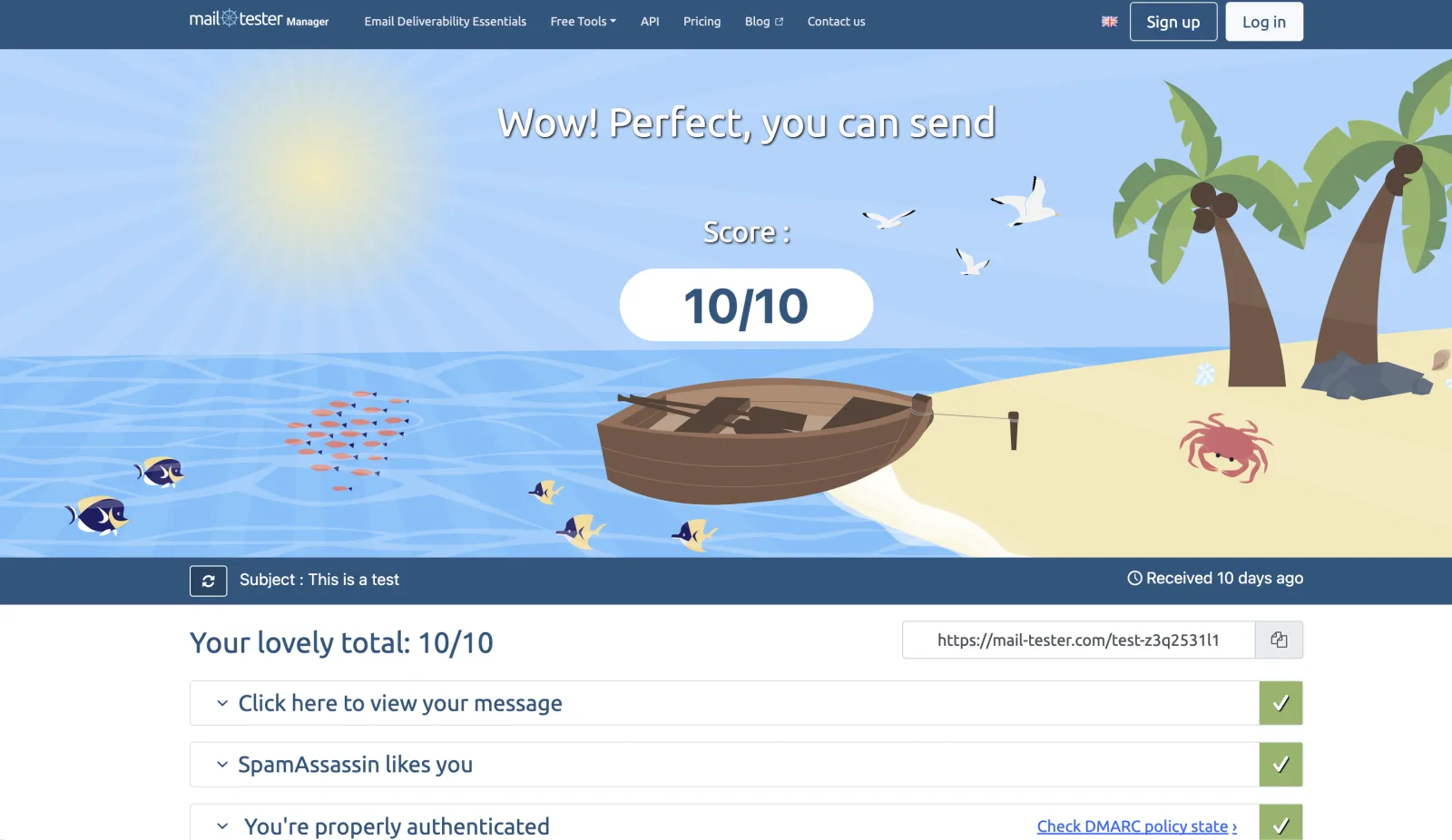
    Then send a few sentences of ordinary text to mail-tester.com and check the score. SPF, DKIM, DMARC, PTR and blacklists should all pass, and the report names any record that is wrong.

    If your provider keeps outbound port 25 closed, switch sending to a relay under Settings, Sending. It takes effect straight away.

    mail-tester.com scoring a test message from a UNA install 10 out of 10: SpamAssassin passes and the message is properly authenticated

Troubleshooting

Where it usually goes wrong, and the fix

Mail is not arriving

Inbound port 25 is still closed, or the server was not stopped and started from the control panel after approval.

Mail lands in spam

The PTR does not return mail.yourdomain.com, or SPF, DKIM or DMARC do not match. mail-tester names the record that is wrong.

You cannot send

Outbound 25 is blocked. Switch to Amazon SES or an SMTP relay under Settings, Sending.

The installer stops

Docker or Docker Compose is missing. Go back to Step 2.

The server struggles

It has less than 1 GB of memory.

The certificate fails

The A records do not resolve yet. Wait a few minutes and run ./renew-ssl.sh again.

Afterwards

The morning after: what owning a mail server means

Backups

./backup.sh writes one archive with the database, attachments, settings and DKIM keys. Copy it off the server and keep it like a password.

Your 90 days

They count from the day you install. Buy a license from Settings, License whenever you are ready: €49 a year per install. If it runs out, nothing is lost. Mail keeps arriving and the admin can still read everything. Sending and other users pause until the license is renewed.

Reading mail

Open the webmail in any browser. On your phone it installs to the home screen and sends notifications.

It is your server, so looking after it is up to you.

In your inbox

First things to do in your new inbox

Give each sender its own address

Netflix gets netflix@, your bank gets bank@. It all lands in one inbox, and every message shows which address was used.

  • netflix@
  • bank@

Switch off one that leaks

The sender is told it does not exist, and you can still see everyone who wrote to it.

Rotate it

To a fresh address in one step.

Add the people you share it with

Each person picks their own language, from 24.

Installed for you

Rather not touch the terminal?

€149one-time

I’ll install UNA on your VPS, or on one I set up in your own account, for €149. The first year’s license is included. After that it renews at €49 a year, like any other license.

Included

  • DNS records (MX, SPF, DKIM and DMARC)
  • A TLS certificate
  • Amazon SES as the outbound relay with Easy DKIM
  • A deliverability check
  • Your admin account and a short walkthrough
  • 30 days of help with anything caused by the install

Good to know

  • Old mail stays with your old provider, so export it before you switch.
  • After the 30 days, the server is yours to look after.
  • The server is yours, and so is its bill.
  • I take only a few installs each month.

Questions

FAQ

Can I host email on a computer at home?

No, it needs to be a server on the internet. Other mail servers have to reach yours, and a computer at home behind a router usually cannot be reached or given reverse DNS.

Do I need port 25?

Yes, inbound port 25 must be open, because that is how other mail servers deliver to yours. Outbound can go through Amazon SES or any SMTP relay if your provider blocks it.

Will my mail land in spam?

Not if your records agree. SPF, DKIM, DMARC and a PTR that returns mail.yourdomain.com all have to match. Send a test to mail-tester.com and it names any record that is wrong.

How long does it really take?

The install fits in an evening once port 25 is open. Ask your provider to open it a day ahead, and allow 5 to 10 minutes for A records to resolve before the certificate.

What kind of server does UNA need?

A small VPS with a public IPv4 address and 1 GB of memory or more, on Ubuntu, Debian, CentOS or AlmaLinux, with inbound port 25 open. I run UNA on Vultr.

Can I use Apple Mail, Outlook or Thunderbird with UNA?

No. UNA is webmail only, with no IMAP or POP3, so desktop mail apps do not connect. On your phone it installs to the home screen and sends notifications.

Is UNA open source?

No, UNA is proprietary. Most of what it runs on is open source, like Postfix, Rspamd and ClamAV. If you want a fully free and open source server, look at Mailcow, Mailu, iRedMail or Mail-in-a-Box.

What does UNA cost?

Every install is free for 90 days. After that a license is €49 a year per install, with no limit on users. If you would rather not set it up yourself, I install it for €149, first year included.

How many domains can one install serve?

One. A second domain gets its own install.

What happens if my license runs out?

Nothing is lost. Mail keeps arriving and the admin can still read everything. Sending and other users pause until the license is renewed under Settings, License.

The finished campsite at night, a fire burning in its stone ring beside a steaming mug, and a lantern lit inside the open tent

That is the whole evening

Start with port 25, and the rest follows the steps.

Try it free for 90 days

Rather not do the server part? Request an install for €149, first year included.

Built by Ron Canfield